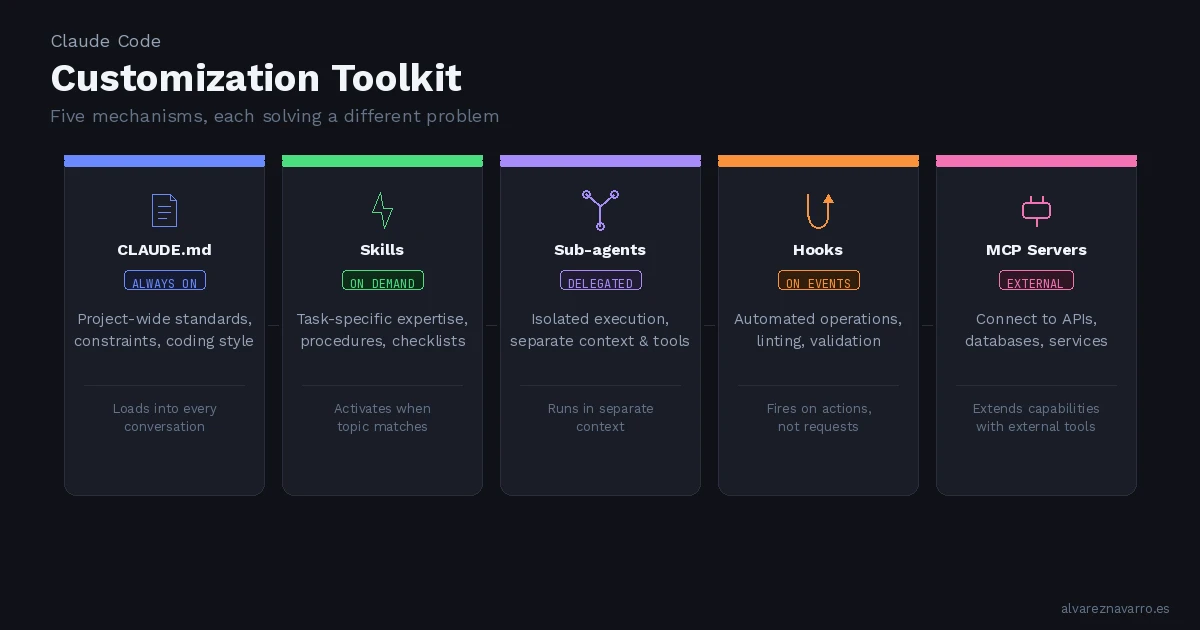
Claude Code ships with five customization mechanisms — CLAUDE.md, Skills, Sub-agents, Hooks, and MCP servers — and each one solves a different problem. Choosing the wrong one means either cluttering every conversation with irrelevant context or missing critical instructions when they matter most.
After watching Anthropic's breakdown of these tools, I wanted to distill the key ideas and share how I think about each one in practice.
CLAUDE.md — Always-On Project Standards
CLAUDE.md loads into every single conversation. It's the equivalent of a project's .editorconfig or .rubocop.yml — rules that apply unconditionally.
Use it for:
- Framework preferences — "Use TypeScript strict mode" or "Follow Rails conventions"
- Hard constraints — "Never modify the database schema directly" or "Always run tests before committing"
- Coding style — Naming conventions, file organization patterns, preferred libraries
The key principle: if the instruction is relevant regardless of what task you're working on, it belongs in CLAUDE.md.
What doesn't belong here: detailed checklists, task-specific procedures, or domain knowledge that only applies sometimes. That's what Skills are for.
Skills — On-Demand Expertise
Skills are the opposite of CLAUDE.md in one important way: they load on demand, only when Claude matches your request to a relevant skill.
Think of it this way: your PR review checklist doesn't need to be in context when you're writing new code. It activates when you ask for a review. A deployment procedure loads when you mention deploying.
Use Skills for:
- Task-specific expertise — Review checklists, deployment guides, content templates
- Knowledge that's only relevant sometimes — Regulatory references, API documentation, style guides for specific content types
- Detailed procedures that would add noise if they were always present
The distinction is simple: CLAUDE.md is "always apply this", Skills are "apply this when the topic comes up."
Sub-Agents — Isolated Execution Contexts
Skills add knowledge to your current conversation — they enhance Claude's reasoning within the same context. Sub-agents are fundamentally different: they run in a separate context entirely.
A sub-agent receives a task, works on it independently with its own tool access, and returns results back to your main conversation. The main conversation and the sub-agent are isolated from each other.
Use Sub-agents when:
- You want to delegate a task to a separate execution context
- The delegated work needs different tool access than your main conversation
- You want isolation between the delegated work and what you're doing — so one doesn't pollute the other
The mental model: Skills are like calling a colleague over to look at your screen. Sub-agents are like sending a task to a colleague who works on it at their own desk and brings you back the results.
Hooks — Event-Driven Automation
Hooks fire on events, not on requests. This is the critical distinction from Skills.
A Hook might run a linter every time Claude saves a file, validate input before certain tool calls, or trigger automated side effects after Claude performs an action. They're reactive — they respond to what Claude does, not what you ask.
Use Hooks for:
- Operations that should run on every file save — linting, formatting, validation
- Validation before specific tool calls — sanity checks, safety guards
- Automated side effects — logging, notifications, synchronization
Meanwhile, Skills are request-driven: they activate based on what you're asking Claude to do. Hooks are event-driven: they activate based on what Claude is doing.
MCP Servers — External Tool Integration
MCP (Model Context Protocol) servers provide external tools and data sources that Claude can use. While the other four mechanisms customize Claude's behavior and knowledge, MCP servers extend what Claude can actually do.
They connect Claude to external systems — databases, APIs, file systems, third-party services — giving it capabilities beyond its built-in tools.
Putting It All Together
A well-configured setup typically combines multiple mechanisms, each handling its own specialty:
| Mechanism | When It Applies | What It Does |
|---|---|---|
CLAUDE.md |
Every conversation | Project-wide standards and constraints |
| Skills | When topic matches | Task-specific expertise and procedures |
| Sub-agents | When delegating | Isolated task execution with separate context |
| Hooks | On specific events | Automated operations triggered by actions |
| MCP Servers | When external tools needed | Connections to external systems and data |
The key insight is: don't force everything into one mechanism. If you're putting detailed review checklists in CLAUDE.md, you're adding noise to every conversation. If you're trying to use Skills for automated validation on file saves, you're using the wrong tool.
Each mechanism has a clear purpose. Match the mechanism to the need, and combine them for comprehensive customization.
My Setup as an Example
For context, on the Rails projects I work on, my approach looks roughly like this:
- CLAUDE.md: Rails conventions, test commands, deployment constraints, coding style preferences
- Skills: Content creation templates, PR review checklists, compliance reference material
- Hooks: Running RuboCop on saved files, validating migrations
- MCP Servers: Connecting to project management tools, calendar, email
The result is a Claude that knows my project's rules at all times, brings in specialized knowledge when relevant, automates repetitive checks, and can interact with external services — all without any single conversation being overloaded with irrelevant context.